Quietroom and Ford have partnered up to find out how members use a GenAI chatbot called PensionsChat.
This report was co-authored by Thomas Joy, who worked at Quietroom from 2022 to 2025, and Ford Motor Company’s Oliver Payne.
In 2024, Ford launched PensionsChat – a generative AI chatbot that aims to answer questions about Ford’s UK pension schemes in a way that’s accurate and usable, without crossing the advice/guidance boundary.
Since its launch, PensionsChat has answered thousands of questions from employees.
Quietroom’s Thomas Joy and Ford’s Oliver Payne have partnered up to find out what PensionsChat can tell us about how pension scheme members use generative AI chatbots and what support they need with their pension.
Download the report (PDF) or read on.
Introduction
Generative AI is opening up new ways for members to engage with their pension. But if members turn to AI assistants like ChatGPT for help, or if they base their pension decisions on the answers they get from Google’s AI overviews or AI mode, then they might get incorrect answers – which could lead them to bad outcomes.
In 2024, Ford set out to give members of their UK pension schemes a safer way to use generative AI.
The team began an experiment to discover whether generative AI can give accurate and usable answers that are free from hallucination and bias, and that do not cross the advice and guidance boundary.
The results exceeded expectations, and so the team built PensionsChat – a generative AI chatbot that can answer questions about Ford’s UK pension schemes.
PensionsChat is safer for employees to use than AI assistants like ChatGPT, because the answers:
- have been tested by pensions experts
- are grounded in Ford’s internal documents
- follow rules about the advice and guidance boundary
- have strong guardrails from prompt engineering
Since its launch, PensionsChat has answered thousands of questions from employees.
Quietroom and Ford partnered up to find out how employees are using PensionsChat, and to discover what the anonymised data tells us about what support people need with their pension.
How PensionsChat works
When an employee asks a question to PensionsChat, they’re talking to a large language model (LLM). At the start of every conversation, the LLM sees a system prompt. The system prompt tells the LLM how to behave when talking to an employee.
In PensionsChat, the system prompt includes instructions for the LLM to:
- be polite and professional
- give concise answers
- never make up information or citations
- give a prewritten response explaining where to go for help if it cannot find the answer
- direct members to HR if they need further support
Before the LLM answers an employee’s question it checks internal Ford documents to find the answer. To do this, the LLM looks at the words an employee has used and seeks out words with a similar meaning in internal documents. When it finds a relevant piece of content, it uses this information to help it generate an answer.
The LLM has access to existing internal documents, like scheme booklets and intranet pages. It also has access to resources that were specifically created to help it give better answers, like guidelines on what the advice and guidance boundary is and how to follow it, and FAQs based on the most common questions that employees have asked HR and Pensions teams.
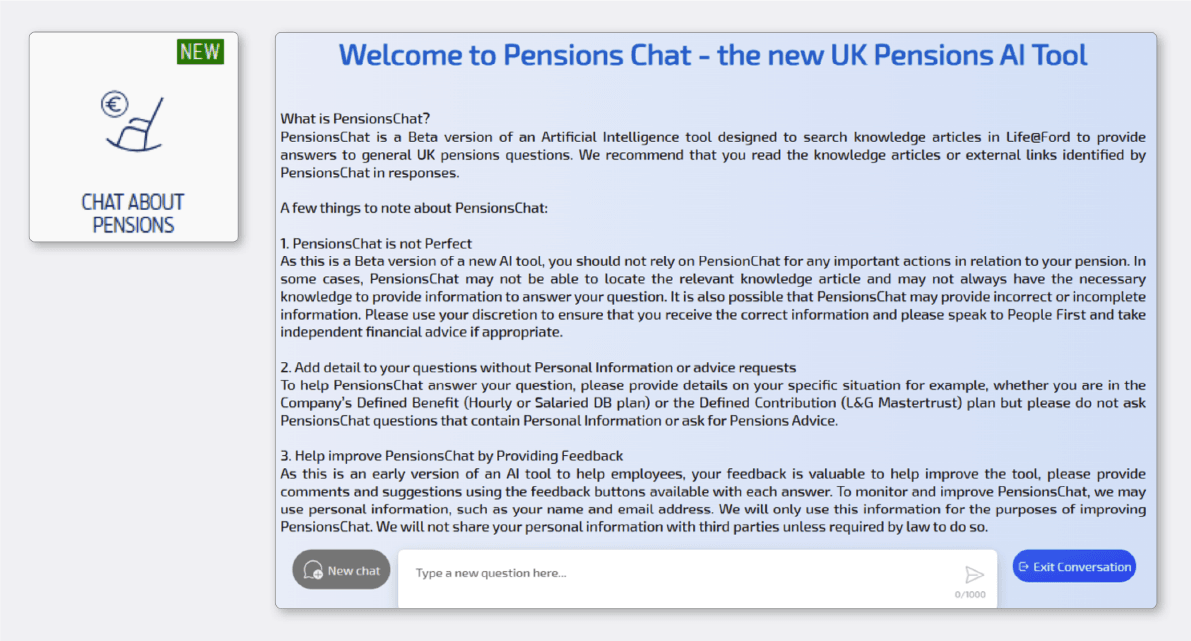
PensionsChat is available 24/7
It’s available for employees who can access PensionsChat on a computer through the Ford intranet, or on a phone through the Ford employee app.
There are some things employees need to know before they use PensionsChat, so the first thing an employee sees when they open it is a welcome message.
The welcome message explains that employees:
- are talking to a chatbot, not a human
- should not rely on PensionsChat for important decisions.
- can get better answers if they give more detail about their question, like which scheme they’re a member of
- should check the sources that PensionsChat provides, and should talk to HR or an independent financial adviser if they’re not sure about an answer
One of the many benefits of PensionsChat is how scalable and efficient it is. It can handle thousands of conversations at once, generate answers to complex questions in seconds, and adapt its responses to match what employees need.
How employees use PensionsChat
To understand how employees are using PensionsChat, we started by looking at the messages they sent. We learned that 87% of messages are questions. These questions have many different objectives.
For example, some employees used PensionsChat to:
- understand processes, like “how do I get an up-to-date pension figure”
- find out how to take actions, like “how do I increase my contributions”
- ask personal questions, like “If my pensionable service started 1 March 1991, and I retire 1 September 2025, which parts of my pension will increase by how much?”
- find links to external providers, like “what is the link to the defined benefit provider?” and “where do I log in to manage my pension?”
Only 6% of employees used PensionsChat like a traditional search engine, searching for keyword phrases like “Annual Pension Calculation” or “Pru pensions”.
The remaining messages employees sent were either instructions (like “show me a comparison”) or social niceties (like “hello” and “thank you”).
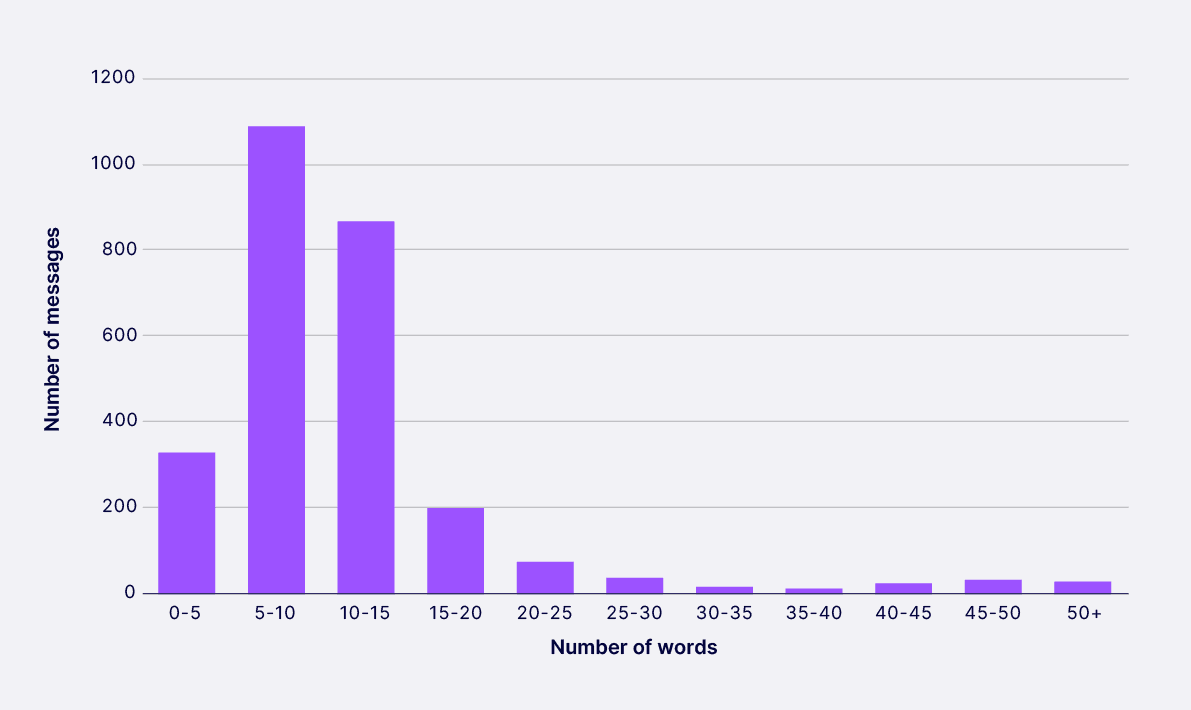
How long are employees’ messages?
Most employees ask PensionsChat short questions. Half of all questions were 9 words or fewer, and three quarters were 12 words or fewer.
We found that the longer the question an employee asks, the more likely they’re describing their personal circumstances and looking for a recommendation on what to do. The shorter the question, the more likely they’re using the PensionsChat like a search engine to find information.
How long are the conversations employees have?
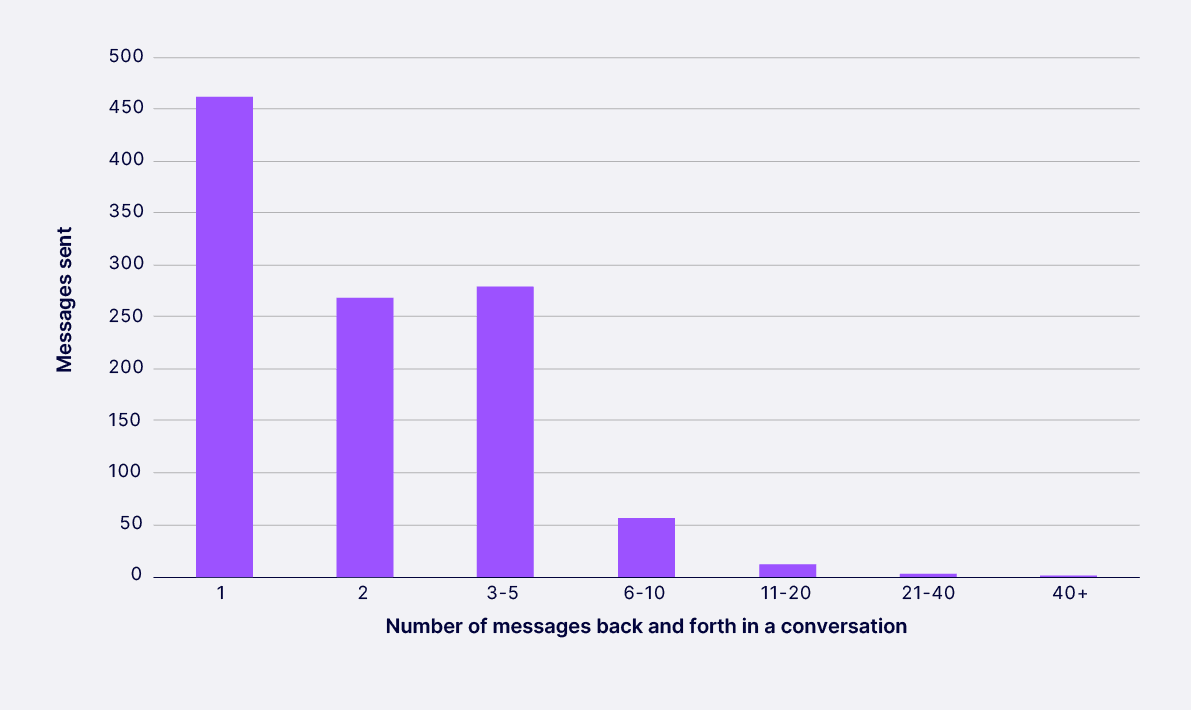
To measure the length of a conversation, we looked at the number of times a user sent a message to PensionsChat and received a reply during a conversation. This is known as the number of ‘turns’ during a conversation.
We found most employees have short conversations with PensionsChat – the median number of turns in a conversation is only 2, which means these conversations were over in just a minute or two.
Of conversations that ran for 3 turns or more, 53% of employees were asking for more detail or to clarify their understanding, 45% asked a different question in the same chat, and 2% clarified or rephrased their questions.
When do employees use PensionsChat?
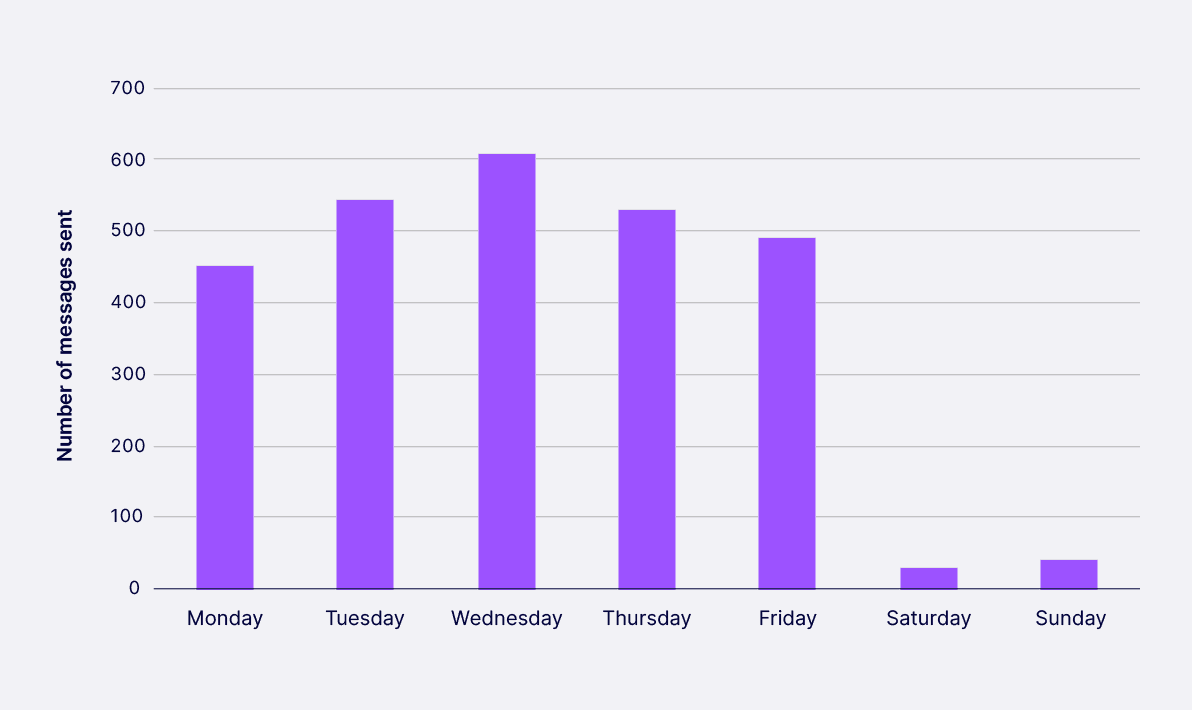
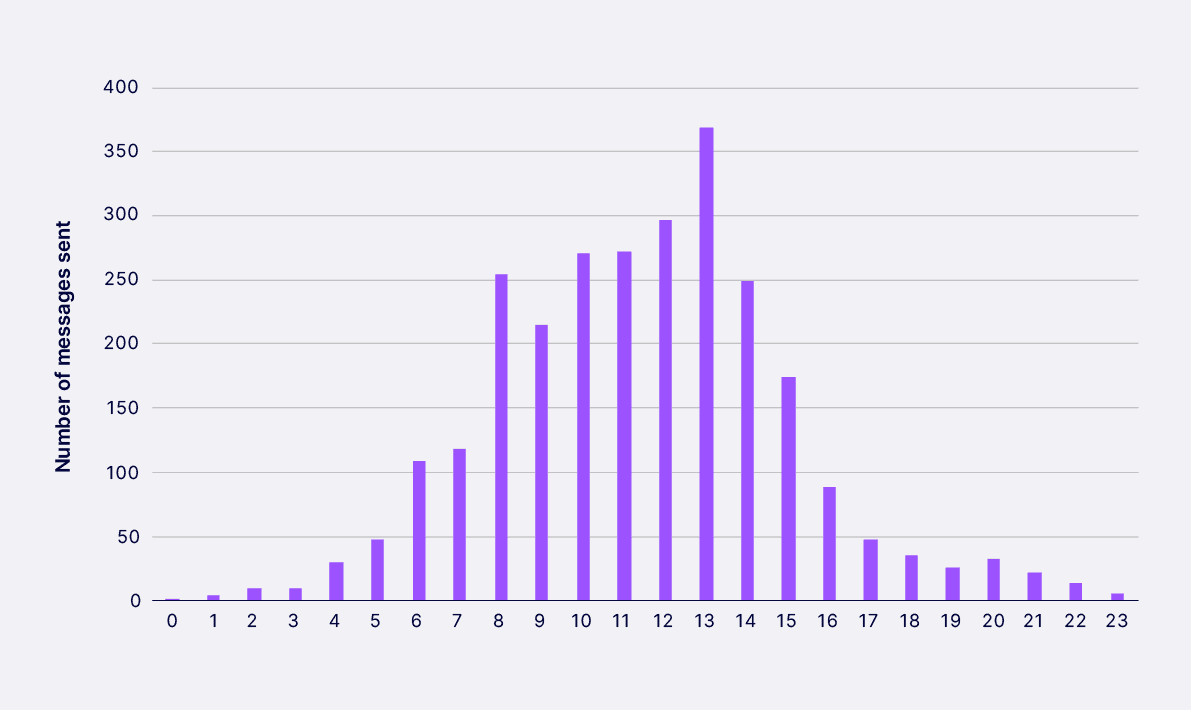
One of the benefits of PensionsChat is that it’s available 24/7. The data shows that most employees use it during working hours, but many also explore their pension at a time that’s convenient to them – like before work, after work and at the weekend.
PensionsChat handles between 200 and 350 conversations a month. Usage was higher when it first launched because of the interest it generated. It was also higher in January 2025 – where more employees asked about changing their contributions, perhaps because this is often a time when people think about their spending.
On what days do people use PensionsChat?
What time of day do people use PensionsChat?
Is PensionsChat helping employees?
To find out if PensionsChat is helping employees we looked at conversation ratings and evaluated the quality of answers.
Conversation ratings
Like many generative AI chatbots, PensionsChat gives employees the ability to rate the answers they get with a thumbs-up or a thumbs-down. If an employee gives a thumbs-down, they can then give feedback on why the answer didn’t work for them.
Interestingly, we found that employees do not use the ratings feature on PensionsChat.
Of 2,700 conversations, only 3.6% were rated. Of these, 60 received a thumbs-up and only 37 received a thumbs-down. Most of these ratings occurred in the first few months of the tool – and on closer inspection, it appears that these ratings are mainly from technical experts and testers who are exploring the capabilities of the tool and testing whether it retrieves new information correctly.
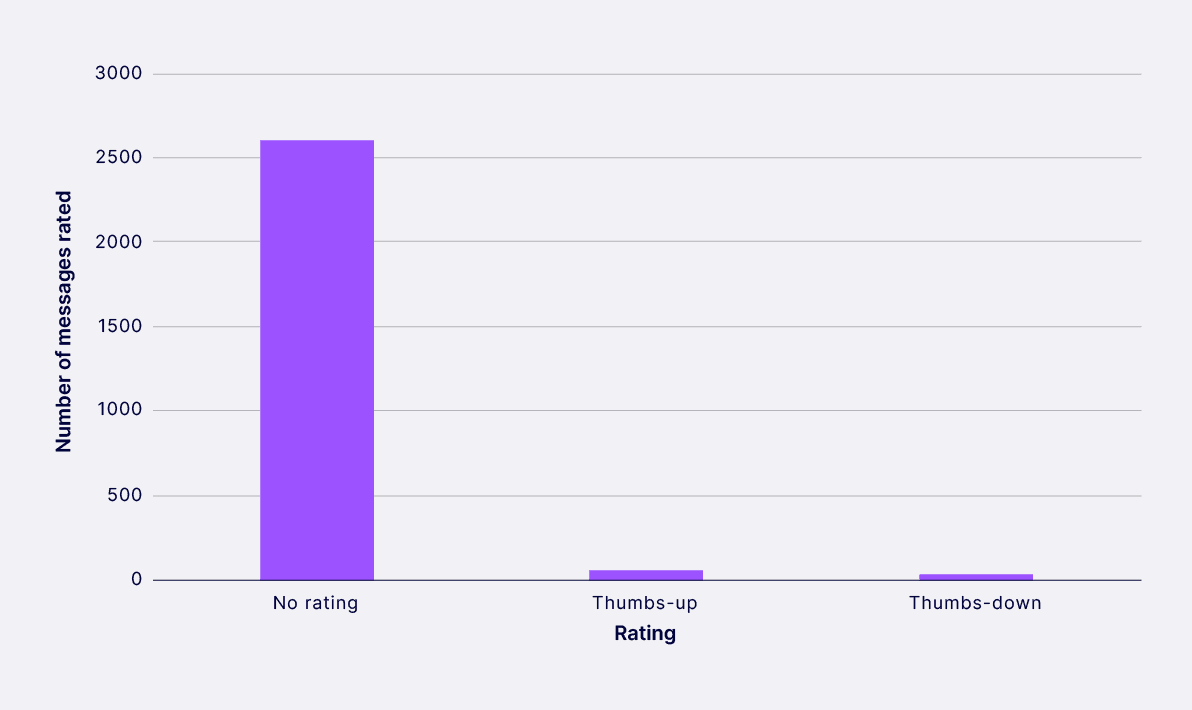
This tells us that companies cannot rely on answer ratings to evaluate whether their chatbots are meeting employees’ needs. Instead, they’ll need to do this in other ways like auditing conversations and talking to employees about their experience through testing.
Answer quality
We found PensionsChat could answer more than 90% of the questions it was asked. Of the questions PensionsChat did not answer, the most common reasons were refusals that helped keep users safe.
For example, PensionsChat explained that it either could not find any information, that it could not give advice, or that the question it had been asked was not about pensions.
From reviewing the conversations employees are having, we see that PensionsChat is giving employees clear, useful, and usable answers.
We think this is largely because the internal documentation that PensionsChat has access to is well written.
We observed that the documentation:
- is created based on data about what employees need
- is written in simple language
- answers employees’ questions directly
- sets out the steps that employees should follow so they can complete actions
All of this means that when PensionsChat writes an answer it’s able to do so without risking errors from having to infer the answer from source material that’s not clear.
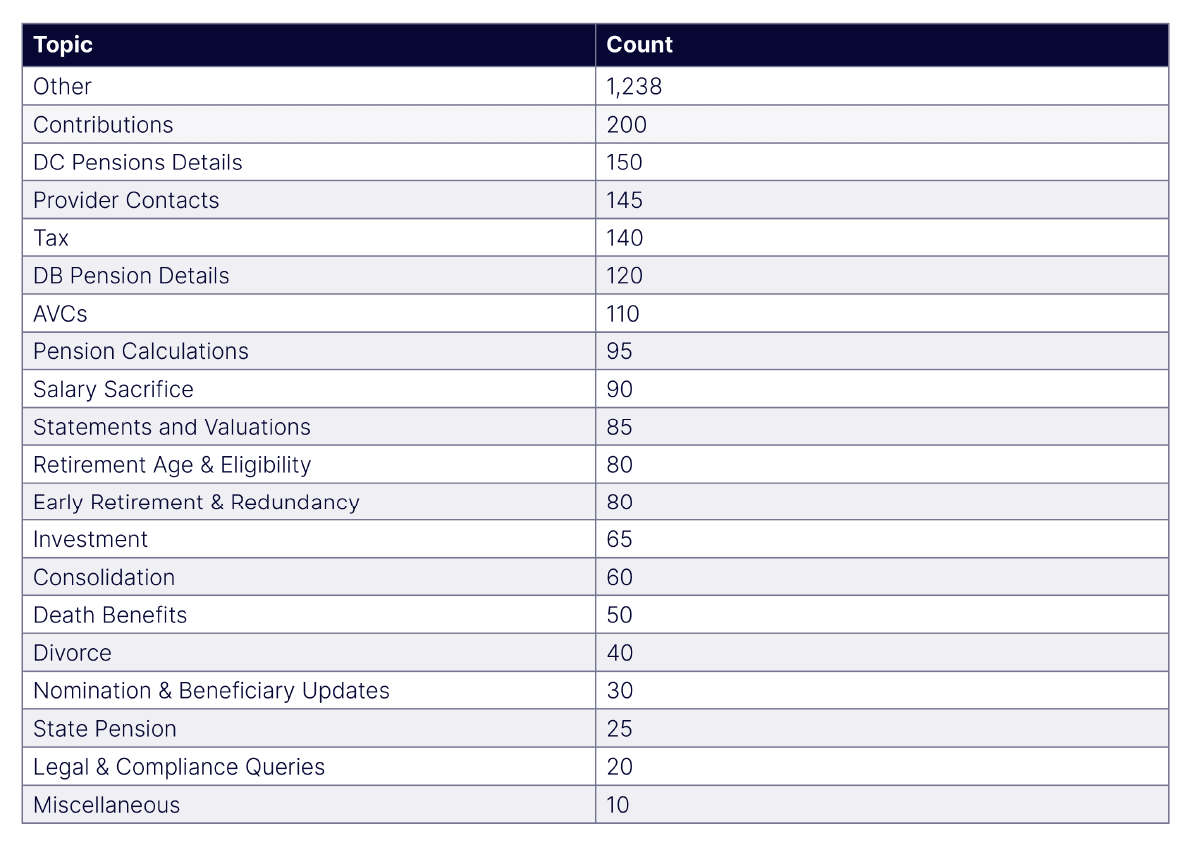
What do employees talk to PensionsChat about?
We used an LLM to review anonymised versions of every employee’s conversation, then group them into themes one at a time. Here’s what we learned:
How could PensionsChat be improved?
In our analysis we found two ways PensionsChat could be improved.
First, PensionsChat could give more actionable answers. For example, PensionsChat will sometimes tell employees to complete a form but it will not provide a link to where they can find the form. As a result, employees may need to ask follow-up questions or find the link to the form on their own. PensionsChat is now being tuned to be more proactive in giving employees what they need, to reduce friction and make it more likely that they follow through on tasks.
Second, we found that PensionsChat can sometimes assume that an employee is part of a certain pension plan. As a temporary solution, employees are told to say which plan they’re a member of when they use the tool – but not all employees do this. Going forwards, PensionsChat could proactively ask employees which plan they’re a member of and use this information throughout a conversation to give more accurate answers.
What can other pension schemes learn from PensionsChat?
PensionsChat shows that generative AI can help pension scheme members get the information they need, when they need it. But its success doesn’t come from the technology alone – it comes from how Ford built and designed it.
Here are 7 things pension schemes can learn from PensionsChat:
1. Start with good content
The quality of answers that a generative AI chatbot gives is heavily influenced by the quality of the content it has access to. PensionsChat works well because Ford’s pension documentation is clear, well-structured and written in plain language. If your scheme documentation is hard to understand or doesn’t answer common questions directly, a chatbot will struggle to give good answers.
Before building a chatbot, make sure your existing content is fit for purpose. This means writing in simple language, answering questions directly, and setting out clear steps for tasks. This helps LLMs find and use the right information to answer questions.
2. Set clear boundaries
PensionsChat is designed to stay within the advice and guidance boundary. It does this through careful prompt engineering and by having access to guidelines that explain what it can and cannot say.
If you’re building a chatbot, you need to be clear about its limits. Make sure it knows when to direct members to speak to HR, an administrator, or an independent financial adviser.
3. Test thoroughly before launch
Ford tested PensionsChat extensively before making it available to all employees. This testing included checking that it gave accurate answers and that it respected the advice and guidance boundary.
Don’t rush to launch. Take time to test your chatbot with real questions, check its answers against your scheme rules, and get feedback from both pensions experts and members.
4. Tell members they’re talking to a chatbot
PensionsChat is transparent about what it is. The welcome message makes it clear that members are talking to a chatbot, not a human. It also explains that employees should check sources and not rely on PensionsChat for important decisions.
This transparency is important. It helps employees understand the limitations of generative AI, and clearly distinguishes between human and AI interactions.
5. Monitor how it’s being used
Ford reviews conversations to understand how employees are using PensionsChat and to check the quality of answers. This ongoing monitoring helps them spot problems and make improvements.
You can’t just launch a chatbot and forget about it. Make sure to regularly review conversations, check answer quality, and tweak the chatbot’s behaviour and documentation so it can continue to meet employees’ needs.
6. Don’t rely on ratings alone
We found that very few employees rate their conversations with PensionsChat. This means you can’t rely on thumbs-up and thumbs-down ratings to tell you if your chatbot is working well.
Instead, you need to actively review conversations and speak to members about their experience. This takes more effort but gives you better insights.
7. Make it part of a wider strategy
PensionsChat works best when it’s part of a broader member engagement strategy. It doesn’t replace other forms of communication or support – it complements them by giving members another way to get information quickly. Make sure to consider how a chatbot fits with the other support you provide for members, what kinds of questions you’ll direct members towards the chatbot for, how you’ll launch the chatbot, and how you’ll communicate the limitations of generative AI.